Showing posts with label NOKIA. Show all posts

Thursday, August 27, 2015

Download Lumia Software Recovery Tool

As LSRT is a consumer centric recovery tool, you can download it from Microsoft’s own servers. Hence, you do not need to browse torrent or pirate sites and end up getting your PC infected. You can download the Lumia Software Recovery Tool by visiting the following download link.
DOWNLOAD RECOVERY TOOL

Using Lumia Software Recovery Tool

The software is pretty easy to use and any computer literate person can use it without any problem. Still, the following section provides step-by-step instructions on using the Nokia Software Recovery Tool to reinstall the software/firmware of a buggy phone or wake up a dead/non-responsive phone (because of software issues).

Reinstall or Update Phone Software

  1. Download the Lumia Software Recovery Tool from the link provided earlier and install it on your Windows PC.
  2. Open Lumia Software Recovery Tool.
  3. Connect your Nokia or Microsoft mobile phone to your PC and wait for the software to detect your phone.
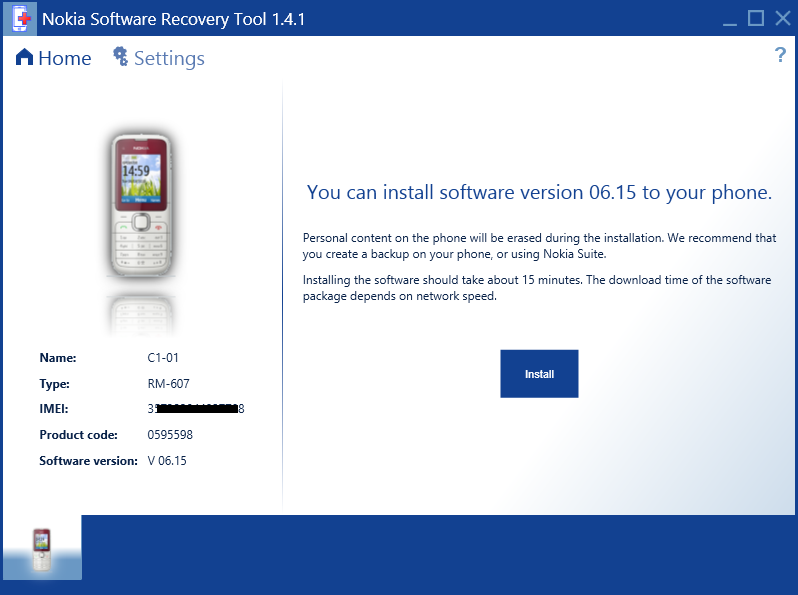
  4. If an update is available, the Recovery Tool will offer you to update the phone software. If no new update is available the tool will offer you to re-install the current software version. Click on InstallRecovery Tool Main
  5. Check the box in front of I understand and want to continue. Click on Continue.
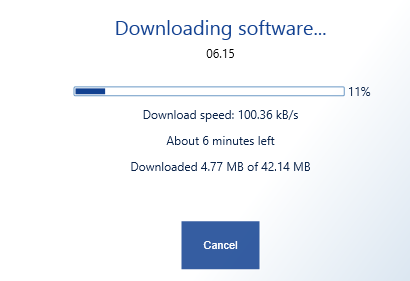
  6. The required software files will now be downloaded. Wait for thedownload to finish.Recovery Tool - Downloading Firmware
  7. Do not disconnect your phone after the download. The software will take a while to start installing the phone software. During this phase the phone will go in Flash or Test Mode.
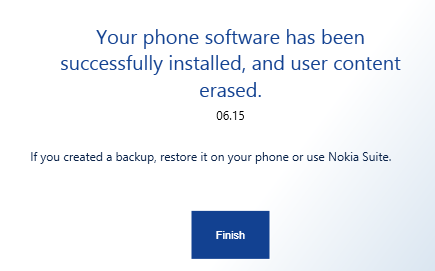
  8. Wait for the phone to restart and a Successfully Updated notification in Recovery tool before you disconnect your phone.Recovery Tool - Updated Successfully

Recover Dead/Unresponsive Phone

Nokia Software Recovery Tool can recover a dead or non-responsive Nokia mobile phone as long as it is a software issue. One thing that should be noted here is that only Nokia/Microsoft Lumia devices running WP8 or higher can be recovered using Recovery Tool. For all other devices, Nokia Care Suite should be used.
  1. Open Lumia Software Recovery Tool.
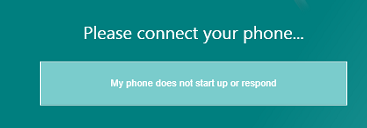
  2. Click on My phone does not start up or respond.Recovery Tool - Device not responding
  3. Disconnect any other phone connected to the system and click on Continue.
  4. Connect your Unresponsive/Dead Nokia/Microsoft Lumia WP8 phone and wait for the Recovery Tool detects it.
    If the phone is still not detected, hold down the Power and Volume Downbuttons till the phone vibrates.
  5. Proceed as instructed (Download Files and flash them to the phone).

Use Nokia Software Recovery Tool To Recover/Reset/Restore Your Lumia Windows Phone Device

Nokia Software Recovery Tool
Very few Lumia Windows Phone device will go into bricked state for some unknown reasons. If it happens, you need to take your device to Nokia Care center to get it restored because there is no way(Ignoring navifirm) you can restore the device by flashing the OS by yourself. It seems Nokia has recently released a tool called Nokia Software Recovery Tool that will allow you to do the same.
Using the Nokia Software Recovery Tool, you can recover your phone if you have software or software update problems. If your phone is not responding, it appears to be stuck or is not starting you can try to recover it at home before initiating a repair.
Usually, Nokia Care guys will have access to latest OS builds before public release. Since Nokia Software Recovery Tool is now available for public, I think it is possible for an average consumer to install latest OS on his device once it is available for Nokia Care units. We have not yet tried this tool with our devices, be cautious before trying with your own device.
via: WPDU Source: Nokia

Nokia Lumia 520 RM-913 Latest Flash File Downloa

nokia lumia 520

Nokia Lumia 520 RM-913 latest flash file download directly for free without waiting longer. This is the latest version firmware setup available i.e 1393.0000.1316.1001. It is tested as well as good and working software setup. This Nokia smartphone with Window Phone 8 operating system comes in the BB5 group. Other groups are DCT3, WD2 and DCT4. It contains mcu, ppm and cnt as well as other files to successfully flash, program or update it. The mcu is the main software setup file, the ppm is for language and the cnt is content package and contains wallpapers, games, logos, etc. The mcu in most models ends with mcusw, the ppm ends with an alphabet while the cnt has the words ucp, nai or image in it. To select files, its better to use ini file settings, so that the software selects all the files automatically. This file has English, Hindi and other local Indian languages.

All the flash files of this model are of small size file, so it can be downloaded very easily within a few minutes. You can flash any Nokia mobile phone with UFS Micro (HWK) Box, ATF, JAF or Universal box. There are also many other flasher boxes available for flashing this Nokia Lumia series Windows OS based smartphone. You can also flash or update any Nokia handset with Nokia phoenix service software. Flashing or updating is required to repair software-related faults in cell phones.

Click below to download the Nokia Lumia 520 RM-913 firmware and flash files:

Phone Name : Nokia Lumia 520
Product Type : RM-913
Variant ID : 7212366443
Variant Name : PWBASSY RM-913 LIGHT SWAP ENG CN
Product Code : 059S0P9
Software Version : 1393.0000.1316.1001


File Name :  (352 Bytes)

File Name :  (212 Bytes)

File Name :  (1.03 Kb)


File Name :  (22.46 Kb)


Read our UFS Micro Box Guide For Nokia to learn how to flash a Nokia mobile phone with UFS Micro Box. Flashing is required to repair any software related problem like hanging, switching off automatically, booting problem, contact service, etc.

Disclaimer: Although we always try to give the best and working flash files and firmwares, we do not guarantee the compatibility or accuracy of any of the files. So use them at your own risk!

Caution: Flashing and formatting of cell phone deletes all data like images, ringtones, music, contact numbers, etc. So it is important to take a backup of the data before flashing. Always use an upper or the same version while flashing BB5 mobile phones. Also keep in mind that downgrading the firmware version can create problems. So its better to use the same version or a later version.

One thought on “Nokia Lumia 520 RM-913 Latest Flash File Download

- See more at: http://www.allflashfiles.com/nokia-lumia-520-rm-913-latest-flash-file-download/#sthash.8nEReWIc.dpuf

How To Flash & Brick/Dead Flash Your Nokia Lumia with Nokia Software Updater for Retail - See more at: http://www.nokianesiablog.com/2013/10/how-to-flash-brickdead-flash-your-nokia.html#sthash.dYOYA4BW.dpuf


The New Nokia Software Updater for Retail version 4.1.0 allows you to flash (Re-install, Update firmware) your Nokia (Nokia Lumia, Asha, S40 & Symbian) and Special for Nokia Lumia with Windows Phone 8 you can do flashing with brick/dead flash mode

Flashing with Brick/dead flash mode will helps you to recover your Nokia Lumia with Windows Phone 8 when your phone is getting stuck on rotating gear when updating or restoring. After flashing, your Nokia Lumia Windows Phone will be recovered (all data and apps will be erased). 

Before Flashing (Normal & Brick/Dead Flash Mode)
  • Flashing with Nokia Software Updater for Retail will erase all data and applications on your Nokia devices.
  • Flashing may void your warranty
  • Please recharge your Nokia first before flashing
  • Nokia Software Updater for Retail v 4.1.0 only compatible with Windows 7 & 8
  • You will need Internet connection to download firmware
  • Do it with your own risk

How To Flashing Your Nokia (Normal Flash)
  • Connect your Nokia
  • Update notification will appear if Available, click "Update" to Update your firmware or re-install your firmware

  • Please read carefully the terms & condtions, checked list "I Understand.." and click "Continue"

  • Now you will downloading firmware package, just wait until downloading process is finish. After that you will go automatically to flashing process. Don not unplug your cable until all the process are finish

  • Finish, Your Nokia already flashed and ready to use

How To Flashing Your Nokia Lumia Windows Phone 8 (Brick/Dead Flash)
  • Available only for Nokia Lumia with Windows Phone 8
  • Download Nokia Software Updater for Retail 4.1.0
  • Install it
  • DO NOT CONNECT your Nokia Lumia Windows Phone 8 to PC/Laptop
  • Open Nokia Software Updater for Retail 4.1
  • Click "My device does not Bot Up"

  • Click "Continue" to recover your Nokia Lumia Windows Phone 8

  • Connect your Nokia Lumia Windows Phone 8, please wait for device connection, you will need do some task (press and hold the power button and the volume down button until the phone vibrates), Just follow the instruction until your PC/Laptop detects your Nokia Lumia Windows Phone 8. 

  • After That, you will downloading the firmware (if needed) and just wait until downloading process is finish. After that you will go automatically to flashing process. Don not unplug your cable until all the process are finish.
  • Finish, Your Nokia already flashed and ready to use
- See more at: http://www.nokianesiablog.com/2013/10/how-to-flash-brickdead-flash-your-nokia.html#sthash.dYOYA4BW.dpuf

Nokia X,X+,XL Android Mobiles Flashing tutorial + Firmware Downloader


Note: Flashing(Refurbish) - It will remove all user content from the memory (not SD) nd restore all settings 2 factory ones. It vil works only on connected nd not dead phones. 
Recovery This options will recover dead phone or will flash different software variant designeted for other markets. Phone if is live must be powered down and not connected to NCS until massage pop up during flashing while after when you press the Start

Note : To Refurbish and LPC: For device detection, user needs to manually enter code: *#*#2273#*#* on device dial-pad and enable WinUSB mode by selecting it on device’s screen. Same action is always needed after finalized flashing 


To get start first download latest NCS with support Nokia X series.

Download NokiaCareSuiteForStore-5.0.60.1409 Nokia android supported
Firmware(ROM) Downloader Nokia DataPackage Manager 2013.7.5 No need login
:: How to download firmware see below given n the picture ::

How to flash the nokia android mobiles nd recover Bricked Mobiles 
* Download all ROM files and copy them into c:\ProgramData\Nokia\Packages\Products\rm-xxx\
* Launch Nokia Care Suite from yur desktop and click on Product Support Tool for Store 5.0

* If you doing Recovery which is most of cases, unmark Automatic product selection and set No Connection. Do not connect the phone!
Click File-> Open product-> put model name if NCS let you or write down RM version, for example 980


* Then Programming-> recovery, downloaded packages will show up in the window 

* Click on an firmware and press Start, wait for massage windows and follow it.


Nokia X - 980
Nokia X+ - to be updated
Nokia XL - to be updated

Nokia X (RM-980) Product Codes
059V301: RM-980 GLOBAL SWAP
059T991: RM-980 NDT APAC ID ERA
059T992: RM-980 NDT APAC ID PAR
059T993: RM-980 NDT APAC ID TRI
059T9F0: RM-980 NDT APAC MY
059T983: RM-980 NDT APAC TH
059T982: RM-980 NDT APAC VN
059T9D8: RM-980 NDT EURO PL
059T989: RM-980 NDT EURO TR
059T9G1: RM-980 NDT EURO UA
059T9G0: RM-980 NDT IMEA AE
059T9F2: RM-980 NDT IMEA EG
059T985: RM-980 NDT IMEA IN
059T9F4: RM-980 NDT IMEA KE
059T9F9: RM-980 NDT IMEA KW
059T9F5: RM-980 NDT IMEA NG
059T9F7: RM-980 NDT IMEA **
059T986: RM-980 NDT IMEA PK
059T9F8: RM-980 NDT IMEA QA
059T9F6: RM-980 NDT IMEA SA 


Nokia X - How boot in Recovery and Bootloader Mode

:: Nokia Recovery Mode ::
1. Turn off your device
2. Press Volume + and Power Button 15 seconds

:: BootLoader Mode ::

1. Turn off your device
2. Remove wires and battery
3. Hold on Volume + Key while you connect USB
4. Device should be detected as Qualcomm CDMA Technologies MSM

Download NOKIA X Flash Tool, an All-in-One tool to Flash System, Boot, Recovery & Fastboot – Details Read more at http://androidadvices.com/download-nokia-flash-tool-allinone-tool-flash-system-boot-recovery-fastboot-details/#bCHmiBXyRHD8Hybu.99

While no one would have ever thought that NOKIA will someday be coming up with an Android smartphone, here comes the flasher which will help you to flash the system, boot, recovery and also one can easily flash the partitions. So after checking out the list of quick pre requisites mentioned below, lets proceed to check on what are the quick pre requisites first and then we will head over to the detailed procedure which will help you use the Nokia X Flashing tool.
Quick Pre Requisites:
  • Create a manual backup of all the data present in your Nokia X android smartphone so as to make sure that just in case if the data gets lost or corrupted, the same can be restored with the help of simple steps.
SMS – Use “SMS Backup & Restore app”,
Contacts – Sync with the Gmail application,
Call Log – Call Log and Restore
Images, Songs, Videos, Files – Copy to internal / External SD Card,
APN and MMS Settings – Note down from the path “Applications > Settings > Wireless and Network > Mobile Networks > Access Point Names
  • Battery charge left in your device needs to be a minimum of 60% or else device might get turn off in the middle of firmware update.
All thanks to Senior XDA member AngSanley who has come up with this flashing tool. So, lets check out on how you can use this tool for flashing the tool.
Procedure to Use Nokia X flashing tool:
Nokia X Flasher

  • Connect your device to the computer with the help of original USB cable and then click on “Detect Device” and then you can select the files at your convenience which may range form system, boot, recovery, variant, data, cache and pre load.
  • In coming days to come, we will be coming with the articles which will help you install the custom recovery images.
  • Just in case if you missed it, you can root and install the boot loader in your NOKIA X android smartphone and also you can install the custom ROM firmware which is based on Jellybean 4.1.2 Android OS.
Note: If at all your Nokia X smartphone gets in the boot loop mode, then you need to turn off the device and then reapply the update from the start. To turn off you can long press the power button and repeat the whole process again.

Read more at http://androidadvices.com/download-nokia-flash-tool-allinone-tool-flash-system-boot-recovery-fastboot-details/#bCHmiBXyRHD8Hybu.99