Showing posts with label china Phone. Show all posts

Wednesday, September 2, 2015

How to Flash / Restore Android Tablet PC with Livesuit . Step by Step LiveSuit Flashing Tutorials .

Livesuit Flashing Tool support and work with Allwinner A10,A13,A20,A31 Chipset based Tablets . Its great tool to restore your tablet on stock firmware orupgrade tablet pc. However there are more tools available for flashing Allwinner tablet but Livesuit is best available flashing tool for Allwinner Tablets. 
See video tutorial : How to flash Allwinner Tablets


Most of time no need to connect tablet with PC to start Livesuit but sometimesLivesuit give error in opening ,in this case you need to connect tablet first then click on Livesuit.exe.

Livesuit Allwinner tablet flashing tool
1.Download Livesuit Flashing tool and double click on Livesuit.exe to run the tool.

Livesuit Allwinner tablet flashing tool
2. Now Click Yes .

Livesuit Allwinner tablet flashing tool

3.Livesuit wizard will ask for "Please select upgrade mode".
Click Format.

Livesuit Allwinner tablet flashing tool
4.Click on NEXT.

Livesuit Allwinner tablet flashing tool

5. Select .img file,firmware you have downloaded for tablet . Unplug tablet if you connect it to PC previously. 

Livesuit Allwinner tablet flashing tool

8.Select firmware and click open.

Livesuit Allwinner tablet flashing tool

9. Now plug your tablet to computer. Press Volume down button and insert cable in Tablet. PC will recognize you tablet and will install drivers. 

Livesuit Allwinner tablet flashing tool


10. Once it done tablet will be connected to PC and above window will pop up.

Livesuit Allwinner tablet flashing tool


11. Selecting Format upgrade mode is always suggested. This will erase all your data . 

Livesuit Allwinner tablet flashing tool
12. Select "Yes" to enter in format upgrade mode .If you choose "No" make sure you are installing same version of firmware already installed by company. 

Livesuit Allwinner tablet flashing tool

13. Click Yes
Livesuit Allwinner tablet flashing tool

14. Flashing process will start .It will take 3-5 minutes to complete the firmware loading.

Livesuit Allwinner tablet flashing tool


15. A window will pop up with massage OK . Click on Ok. 

Livesuit Allwinner tablet flashing tool
16. Disconnect the tablet and turn it on. First boot will take 2-4 minute to loading complete files. Do not panic. You are done. 
Make sure to charge battery more than 60% . Power failure during flash may result dead tablet. 

How to find your Chinese Tablet firmware or Flash file using board ID?

f you have a tablet especially one of those Chinese Tablets that seem to be everywhere and for some reason it becomesstuck on the Android screen then you will need to Flash the firmware of your tablet as shown in our previous article, but the task is easier said than done. I am here to make the process much easier by guiding you through the entire ordeal so that you can get your Android tablet back to functionality so that you can begin using it again, so lets cut the chit-chat and get to finding your Chinese Tablet firmware, if you are looking for a your Firmware download only skip to the end of the article.

How to identify your Tablets Processor and Board ID?

The process of identifying your tablets firmware begins with knowing your Tablets Processor and board ID, believe it or not most of these entry-level Chinese tablets are usually sporting similar boards and processors for the most part, the names of the devices might change e.g. Alldaymall, Irulu, GPad or so on but beneath they are sporting similar hardware and all you have to do is find a firmware that matches the board ID and the processor or ones thats close and you can flash your tablet and have it functioning as new. The two main type of processors that you will find on your tablet are usually the A13 and A10 processors respectively.
Chinese Tablet firmware
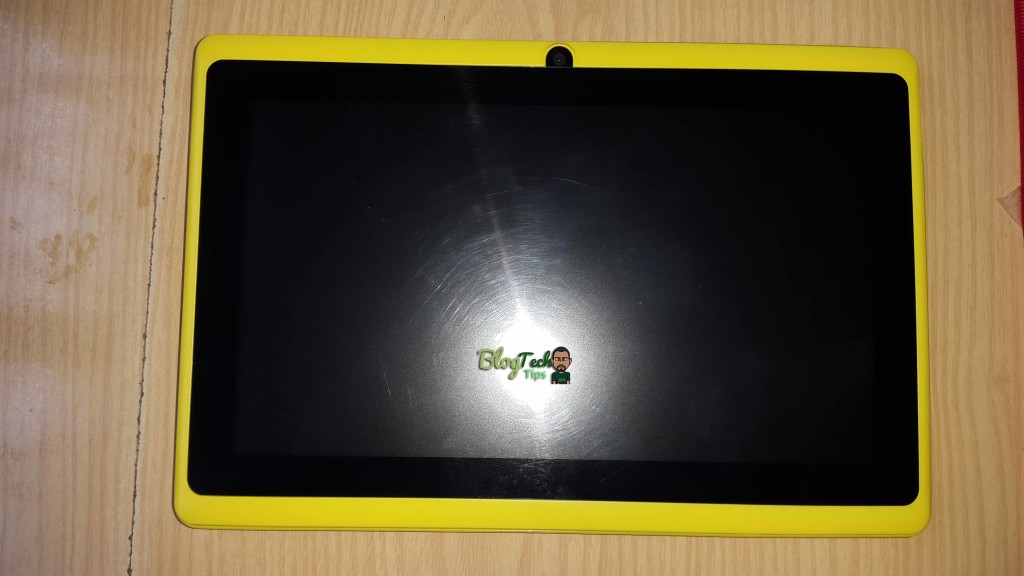
To find out both you will need to open your Tablet, do not panic it’s not as bad as it sounds trust me, here are the steps:
1. Tablets do not have screws that seal them in most cases so you will have to find the seems that hold both halves together.
2. Once you have found the seems, use a tool set such as the ones used in opening phones or a blunt object and force it into the seems,its best to start around the charge port in most cases, the parts will separate with little trouble as long as you are firm-do not break the clips that hold both halves together but separate the halves until the entire thing comes apart.You can refer to the video for details instructions.
Chinese Tablet firmware
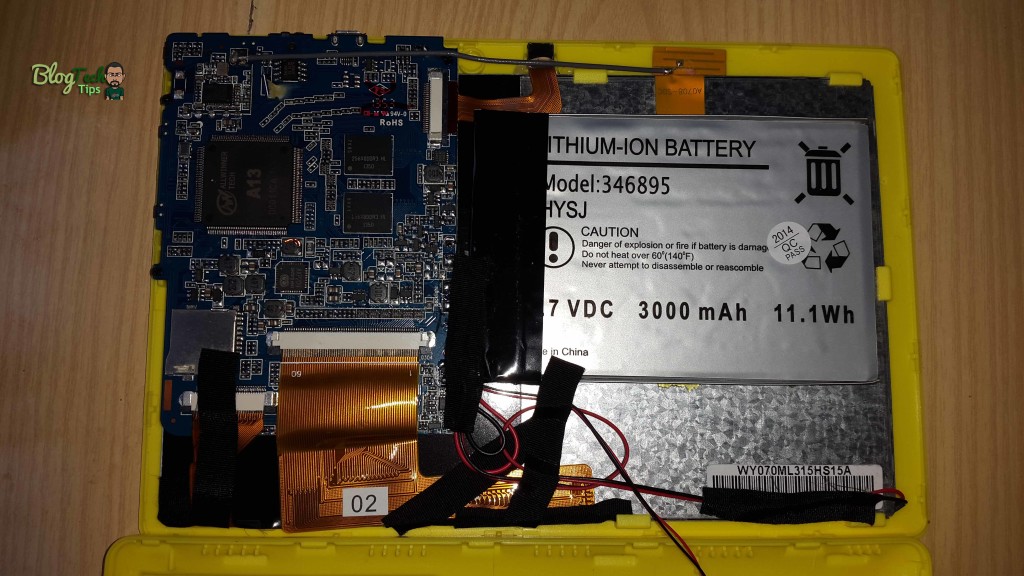
3. Once both halves separate, carefully move them apart and watch out for wires such as the one that runs from the speakers.
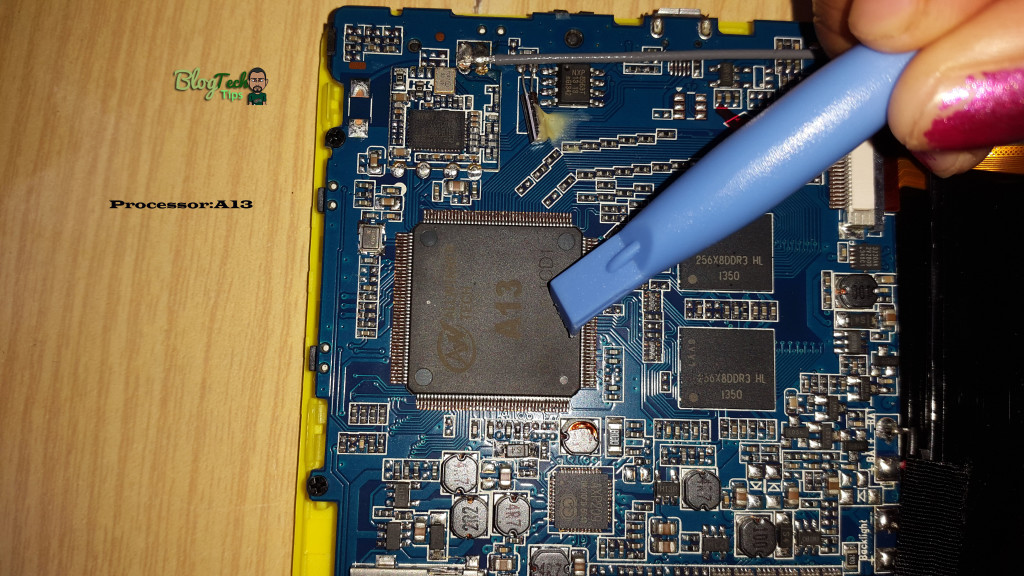
4. Look on the main part of the board and you should see a processor look out for A13 or A10 marked on them clearly:
Chinese Tablet firmware

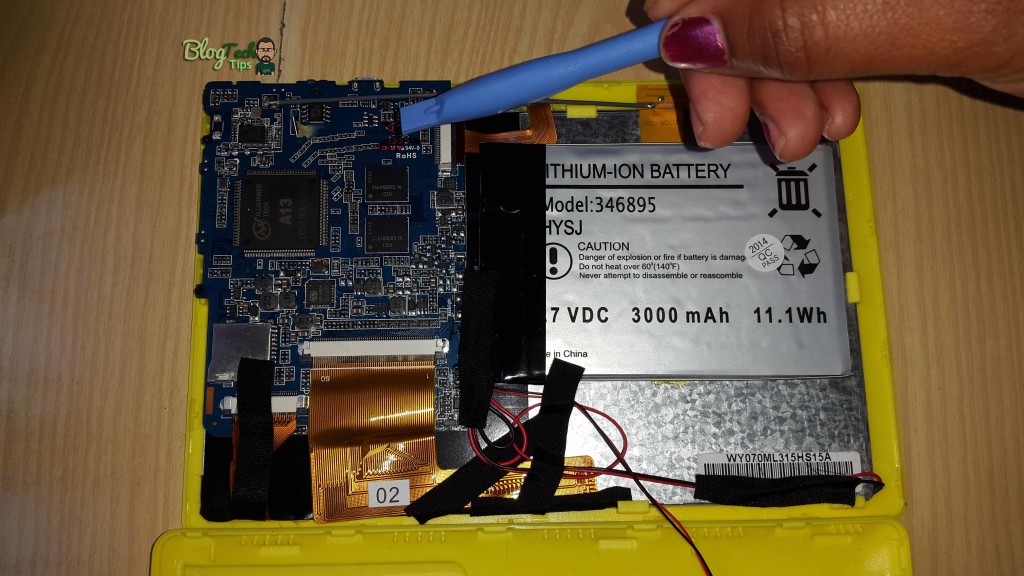
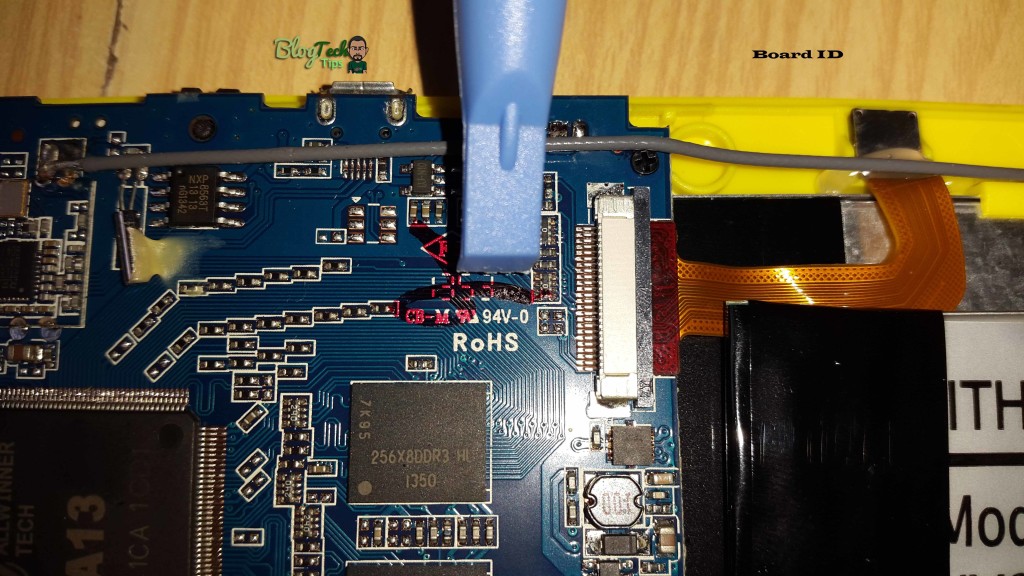
5. Last look on the board for a number its usually at the top section and it’s clearly written, this will be your Board ID, record it:
Chinese Tablet firmwareChinese Tablet firmware
That’s it you have just found your Motherboard ID and Processor, in this case the board in the tablets ID was:CB-M RU 94V-0
The processor was: A13
So now I need to search in Google for “A13 CB-M RU 94V-0 Firmware” or you can check below I have included a detailed list of the most sorted after firmwares including the one for the tablet used in this tutorial.

Watch the Video to see how its done:


Let me Help You Find your Tablet Firmware

In order for me to help you please comment and tell me the following and I will Add your Firmware to this article and also give you a direct link to downloading it so you can flash your Tablet, I will need the:
Tablet Processor: __________________
Board ID: _______________
Brand Name: _____________
Do that and I will Find your Firmware for you.

What do I do next?

Next you can return or go to the article that shows you how to flash your device here after downloading your Firmware File.

Android Tablet Firmware Downloads:

So here are the Chinese Tablet firmware files of the most sought after devices, also note that the files are usually compressed with WinRAR or are direct .img files:
Download all 1000+ A13 and A10 Firmware list to find your Firmware (Microsoft Word File) :BlogTechTips.com The Entire A10 and A13 Firmware list simply search for your Firmware
1. A13_Q8_2127-V4_0309_0912_20120918 Download

how to flash the tablet android china

Why do I write a little review tutorial how to install Android on Tablet china, before I wrote this tutor a lot into its core e-mail me asking for help how to flash the tablet android china


because most of those who ask no complaints sound the same after flashing his touchsreen had no puncture


There is also an experienced boot loop, did not want to start any Android logo appears only


In this tutorial I have tried to install the Universal Uberoid Uberoid ROM WM8650 by HCH Here are step by step tutorial on how Uberoid wm8650 flashing via, this way I do and 100% successful touchscreen Soud and had normal lumbar:


1. Download Universal Uberoid WM8650 by HCH to your pc


2. Extract the zip file to a directory on your computer using winrar or other archive software.


3. Connect the sd card into your pc


4. look carefully at what drives the location of what is on your SD F what where.


5. open the downloaded file was already extracted.


6. when it is in the polder double click ''changer.bat'' will display the picture as below
http://dc501.4shared.com/img/O-PtAt5...tartup21_2.jpg
7. Type the command'' SDFORMAT "will display some drives select the drive where your SD is waiting to complete the process of formating


8. after any key press format


9. Click again when the menu is missing changer.bat, select the number that corresponds to your android tablet type clay sample images:
http://dc268.4shared.com/img/pTz-2d0...econdmenu1.jpg
http://www.tech-recipes.com/wp-conte...eroidcopy1.png
completion of the copy remove the SD card into the SD input your android Tablet will
automatically do the flashing yourself waiting up to 100% then he would pull the SD card automatically retstar


after retstar not in SD karu his first pair because there is still the source

for more information click here
GOOD CAN HELP

BY WAHID